2026-09-24
I am in the middle of an Ultimate Weapon Dissonance run. I started it on my EHP build, the effective health setup, and it failed at the same spot: Tier 17, Wave 4821. Fast enemies ended it after 4 hours 13 minutes.
That one was annoying, because the run was also my test for an Ancestral Sentry Protocol module. It is not as good as I expected.
UW Dissonance turns off the Ultimate Weapon workshop and pays a UW damage bonus based on the wave you reach. The Dissonance Run Planner shows how that bonus grows with the wave. A run that dies early takes home a smaller bonus, so when a build keeps dying at the same wave, it is time to change the build.
What the damage report said about Sentry Protocol
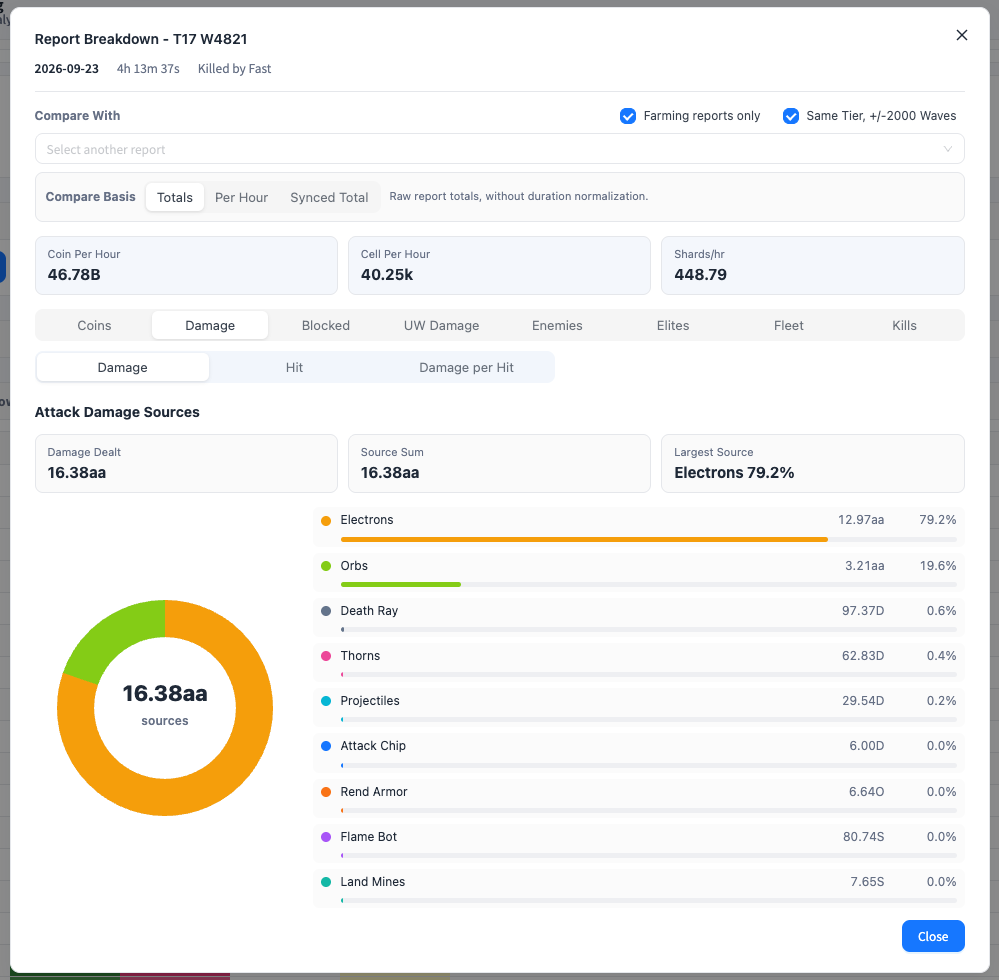
Sentry Protocol drops orb speed to zero. The orbs stay put and fire mini orbs instead, 4 of them at Ancestral. If the module is pulling its weight, it shows up as orb damage. The Module Reroll Simulator lists its values by rarity with the other armor uniques.
Orbs did 3.21aa, 19.6% of the 16.38aa total. Electrons from Orbital Augment did 12.97aa, 79.2%. Each Electron hits for 15% of an enemy's remaining health, and on this run they carried almost everything. Death Ray, Thorns, and Projectiles were each under 1%.
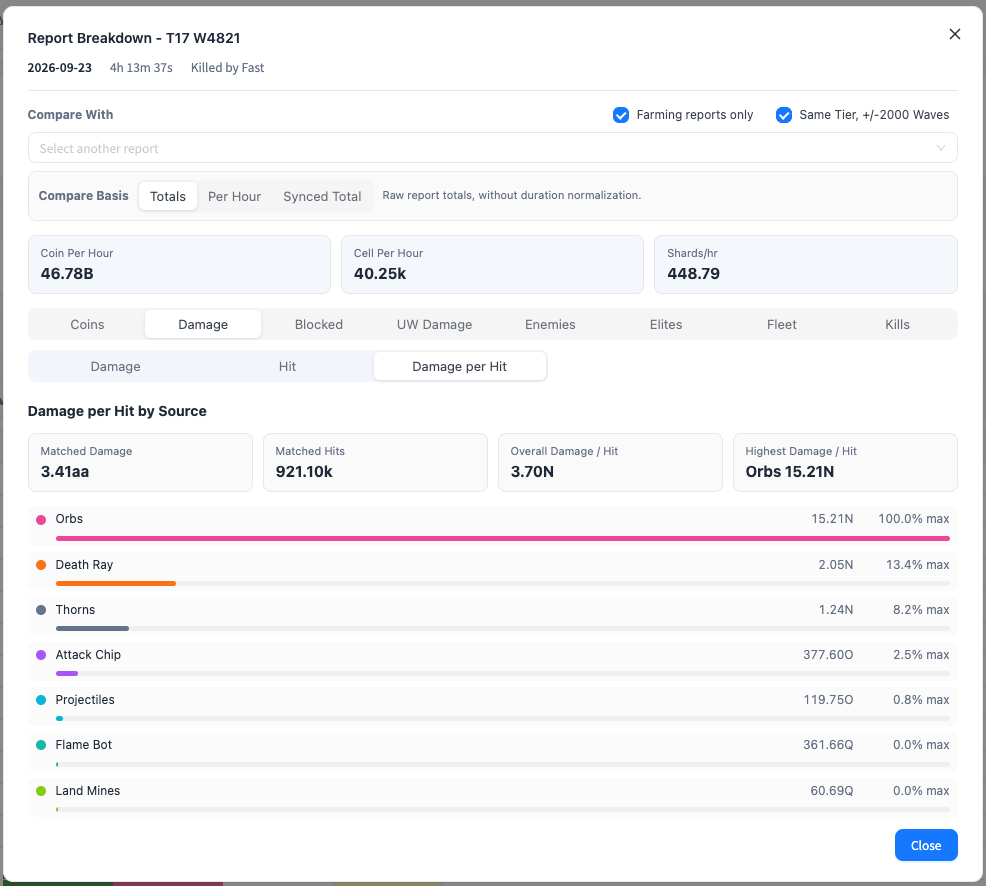
Damage per hit tells the other half. Orbs hit the hardest of any source, 15.21N a hit against an overall 3.70N. Death Ray was next at 2.05N. Each orb hit is big. There are just not enough of them to carry a Tier 17 run, and the build still died at 4821.
Both views are in the report breakdown on the Battle Report Analyzer. Open a report from the Actions column, pick Damage, then switch between Damage, Hit, and Damage per Hit.
So I switched to another build.
Why I almost never filled in battle notes
After I built this site, I seldom used the custom notes myself. Recording a build meant clicking through a lot of module toggles: main and assist for the cannon, armor, generator, and core, then the range. Every report.
I also did not need it much. I remember my strategy for each scenario, so there was no reason to compare a lot of different patterns.
That stops working after Tier 17. Every tier past it gets harder, and the ordinary strategy that carried you may fail. You may need a hybrid build, and I find myself switching modules and range more and more. When I try different builds on the same tier, I want each report to say which one it was, without a round of clicking to say it.
So today I upgraded battle notes with presets and removed that trouble completely.
Save a build once
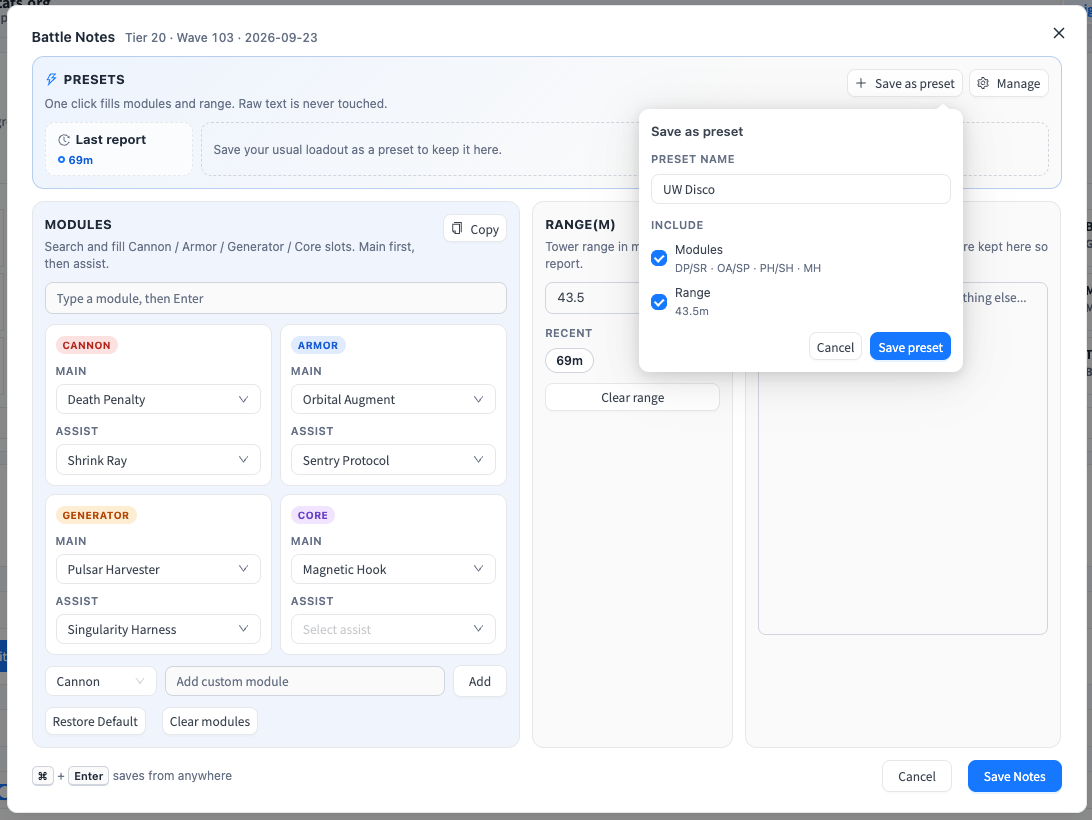
Fill in the modules and range one last time, then click Save as preset. Name it and choose what it keeps: modules, range, or both.
This one is UW Disco, my loadout for UW Dissonance: Death Penalty with Shrink Ray on the cannon, Orbital Augment with Sentry Protocol on the armor, Pulsar Harvester with Singularity Harness on the generator, Magnetic Hook on the core, and 43.5m range.
Then it is one click
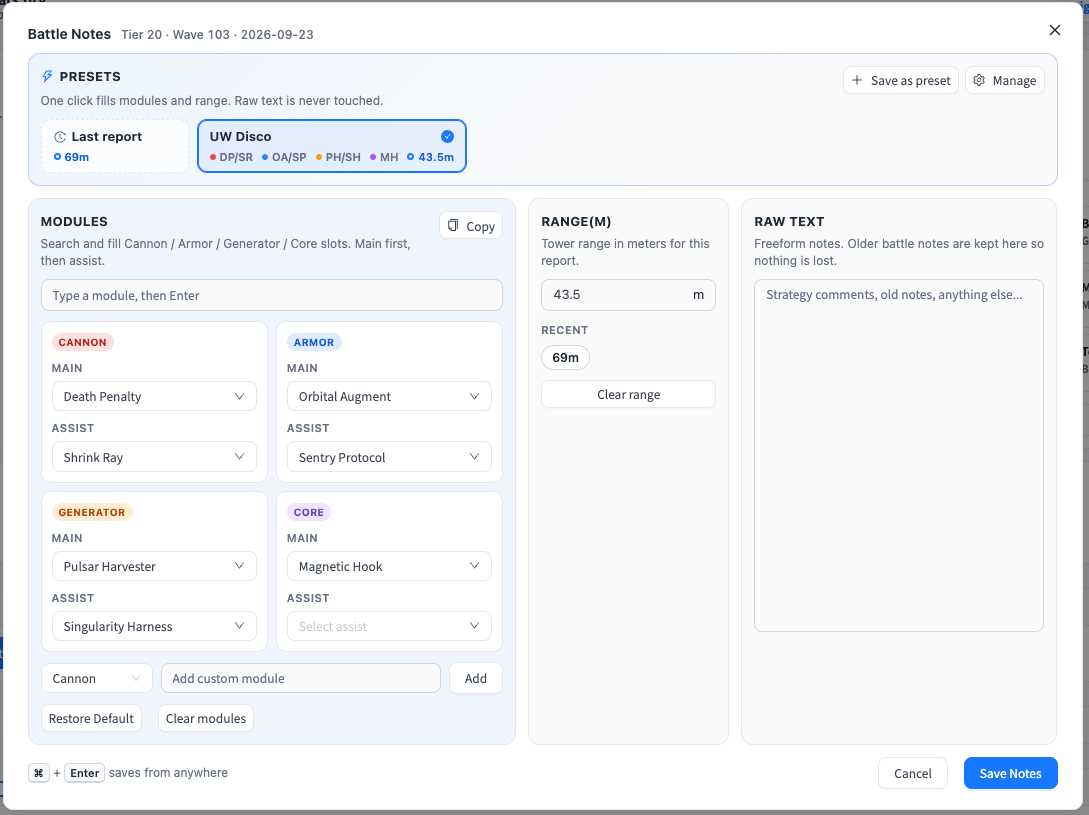
On the next report, open the notes and click the preset. The modules and the range fill in, the check mark shows the notes match UW Disco, and Save gets focus. Cmd + Enter on Mac, or Ctrl + Enter on Windows, saves from anywhere in the window.
A few more things I built in, because I needed them on the first day:
- Raw text is never touched. Strategy comments and old notes stay where they are.
- A preset only fills what it keeps. A range-only preset changes the range and leaves the modules alone, so module presets and range presets can live apart.
- Last report puts the previous report's loadout one click away, even before you save a preset. Mine only showed 69m, because that is all the last report had.
- Recent lists the ranges from your latest reports, one click each.
- Change a slot after applying a preset, and an Update button offers to overwrite that preset.
- Manage renames, edits, duplicates, deletes, and reorders presets, and shows when you last used each one.
- Presets are saved in your browser with your reports. A settings export includes them, so a backup keeps them too.
Compare builds instead of remembering them
The Notes column in the report table shows the loadout in short form, like DP/SR · OA/SP · PH/SH · MH · 43.5m. Once every run carries its build, I can put two builds on the same tier side by side and compare the wave they reached, coins per hour, and the damage breakdown, instead of trusting memory.
The next build gets its own preset. When it dies, or holds, the report will say which build it was.